What AI Can Build: One Toggle. One Click. Your Blog Post Now Speaks
.jpg)



There is a content task a lot of teams keep postponing: audio narration for blog posts.
Not because it is a bad idea. Because the workflow usually sucks.
You export the article, clean the text, generate the voice in another tool, upload the file somewhere else, update fields manually, test the player, and hope nothing breaks on publish. By the time you have mapped all that out, the feature is already losing the argument.
Most teams do the sensible thing and leave it alone.
We wanted to remove that excuse completely.
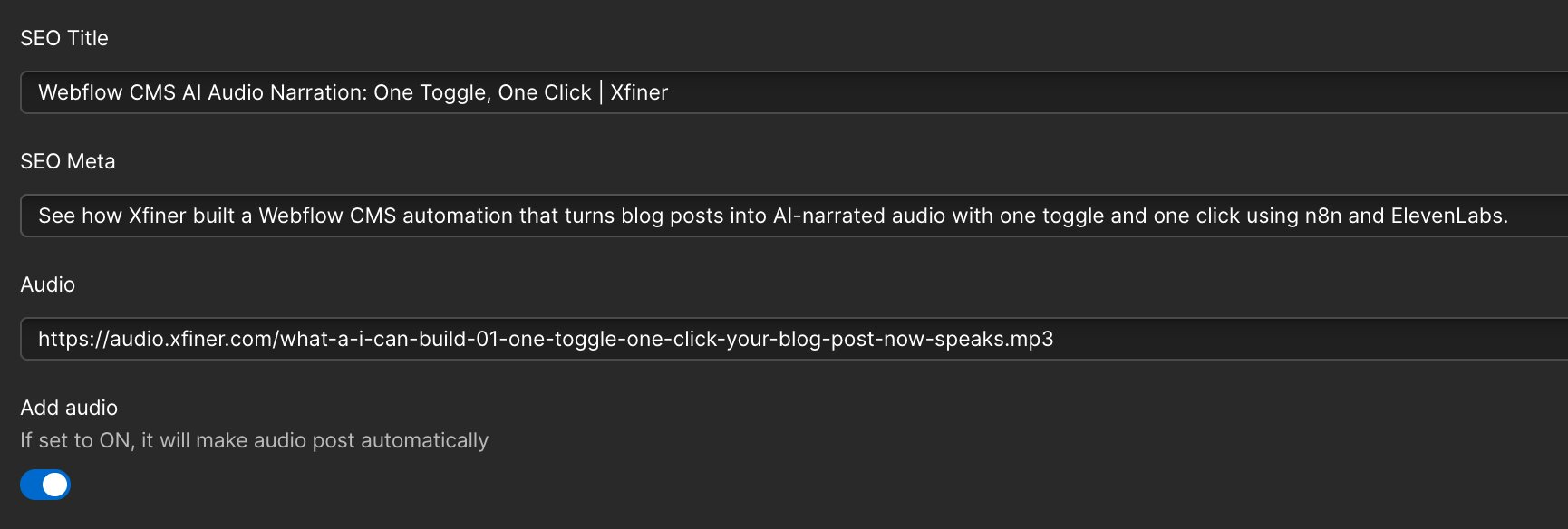
So we built a Webflow CMS workflow where the editor does one tiny thing: turn on Add audio and click publish.
A few moments later, the post has AI narration attached to it.
No extra tool dance. No manual file handling. No support ticket to engineering.
One toggle. One click. And the post starts speaking.
The interesting part is not the MP3.
The interesting part is everything the editor no longer has to think about.
No exporting. No copy-pasting. No uploading. No weird operational side quest just to add one useful layer to a post.
That is what good internal tooling feels like. It does not ask the team to become more technical. It just removes friction that should not have been there in the first place.
Why this kind of feature usually dies before launch
A lot of automation ideas sound great in a meeting and fall apart the moment they touch a real workflow.
The problem is rarely the feature itself. The problem is the extra process wrapped around it.
If the team has to leave the CMS, learn another tool, remember six brittle steps, and involve engineering every time they want to publish audio, the feature is effectively dead on arrival.
That is why we kept this native to Webflow CMS. The editor experience had to stay familiar. If the workflow felt foreign, adoption would drop immediately.
What the editor actually does
For the person publishing the post, the workflow is very small.
Step one: open the CMS item in Webflow.
Step two: turn the Add audio field on.
Step three: click publish.
That is it.
From there, the system cleans the content, generates the AI voiceover, uploads the audio file, updates the CMS item, and activates the player on the live post.
If something fails, the team gets notified. If it works, the editor simply gets the result.
What happens after publish
The quiet part of the system does most of the work.
When the CMS item goes live, a webhook kicks off the automation in n8n. The workflow first checks two things: whether Add audio is enabled and whether the current audio field is empty. That prevents pointless regeneration and avoids overwriting audio that already exists.
Then the rich text gets cleaned before it is ever spoken. That step matters more than it sounds. CMS content often carries awkward spacing, formatting leftovers, and structural junk that make text-to-speech sound stiff or broken. Cleaning the text first makes the result noticeably better.
Once the content is ready, ElevenLabs generates the narration as an MP3. The file is uploaded to Cloudflare R2, the delivery URL comes back, and the Webflow item is updated automatically. The player appears on the live post without anyone touching the page again.
From the editor's point of view, they published a post. The rest just happened.

Regeneration is simple too
This was important.
A workflow is not really useful if it only works on the happy path.
If the editor wants a fresh version of the narration, they do not need a second dashboard or a special admin flow. They can remove the current audio URL, leave Add audio enabled, and republish.
The automation sees the missing file and creates a new version on its own.
That kind of simplicity is easy to underestimate. It is also the difference between a system people trust and one they quietly avoid.
The stack behind it
The editor never needs to think about the stack, but it is worth showing what is happening underneath.
Webflow CMS handles the publishing experience. n8n runs the orchestration. ElevenLabs generates the narration. Cloudflare R2 stores and serves the audio. ntfy sends lightweight alerts when something needs attention.
What made this build especially interesting was how much faster the implementation moved with AI-assisted development in the mix.
The workflow logic, Webflow integration, audio generation path, upload handling, safe field updates, and recovery logic all came together faster because humans defined the system and AI agents helped execute it. The team still set the structure, priorities, and quality bar. AI simply removed a lot of the grind from the build process.
I think this is where things get genuinely exciting. Not because AI magically replaces product thinking, but because it makes custom operational tooling much more reachable than it used to be.
This is not really about audio
Audio is just the visible example.
The bigger point is that custom internal tools are no longer reserved for huge budgets, long timelines, or teams willing to suffer through bloated software projects.
That shift matters.
It means more companies can stop forcing their workflows into systems that were never designed for them. Instead, they can build smaller, sharper tools around the way their team already works.
And those tools often create the most value when they solve something unglamorous: a recurring friction point that quietly wastes time every week.
The human side is still the point
None of this is about replacing the content team.
It is about helping the team do more without dragging them through unnecessary process.
People still decide what gets published, what quality sounds like, what tone fits the brand, and what deserves to go live. The system just removes repetitive coordination work around that decision.
That is the part I keep coming back to. Good internal tools do not make people less important. They make human effort more useful.
Reliability matters more than the demo
Plenty of automations look good when everything behaves.
Production is where the real test starts.
That is why this workflow was built with safeguards from the start. Credentials live in secure environment variables and n8n credentials, not in CMS content. Update payloads are limited to safe fields. Alerts surface failures quickly. Recovery logic is part of the workflow, not something you promise to add later.
None of that looks flashy in a screenshot. It is still the difference between a nice idea and a system a team can rely on.
What A(I) can build
If there is one thing this project makes obvious, it is that AI is useful in two places at once.
It helps create the end feature, in this case the narration itself.
And it helps build the system around the feature much faster than before.
That combination is powerful. It means very specific workflows, the kind businesses used to dismiss as too custom or too expensive, are suddenly much more realistic.
One toggle and one click sounds small.
It is small. That is exactly why it matters.
Small, repeatable workflow improvements are often the ones teams feel every single week.
FAQ
How does AI audio narration work inside Webflow CMS?
An editor turns on the Add audio field and publishes the post. The automation cleans the text, generates narration through ElevenLabs, uploads the file to Cloudflare R2, updates the Webflow CMS item, and makes the audio player available on the live post.
Why build this as a custom internal tool instead of using a separate content workflow?
Because the value comes from removing friction. If the team has to leave Webflow, open more tools, or remember a fragile process every time, the feature usually gets ignored. Keeping the workflow native to the CMS makes it much more likely that the team actually uses it.
Why is this kind of workflow more realistic now than before?
Modern infrastructure, automation tools, and AI-assisted development have changed the economics. Workflows that used to feel too technical, too slow, or too expensive can now be built much faster and with much less overhead.
One last thought
The nicest thing about this project is how ordinary it feels once it is working.
An editor publishes a post the same way they normally would. A short moment later, the post can speak.
No extra operational mess. No awkward workaround. No second workflow to babysit.
Just a better publishing system, quietly doing its job in the background.
If your team has repetitive work that keeps getting postponed because the process around it is too clunky, that is usually a strong signal. A custom internal tool or automation may now be much more realistic than it was even a year ago.
Want to explore what that could look like for your team? See how AI-powered internal tools and automation can help, or book a discovery call.


.png)



.jpg)

.jpg)



.png)

.png)

.jpg)

.png)

.png)