The cost of Dynamics 365 portal development vs Excel file workflows
.jpg)



The ERP existed.
The real operations still lived in Excel.
Every Monday morning, someone exported data from Dynamics 365 into a spreadsheet. Product rows got cleaned manually. Missing supplier information got patched through Teams messages. Updated versions were sent through email. Someone called a vendor because the wrong file version was being used again.
By noon, nobody was fully sure which document reflected reality anymore.
Yet the company technically had a modern ERP.
This situation is more common than most leadership teams admit publicly.
And strangely, many companies stop questioning it because the workflow still “works.”
Orders still move.
Suppliers still reply.
Reports still get built.
Operations still survive.
That survival creates a dangerous illusion:
“If the process still functions, the process must be acceptable.”
In reality, many growing businesses quietly build a second operating system around Dynamics 365.
Usually from:
- Excel exports
- Teams messages
- copied data
- email approvals
- browser tabs
- manual verification
- undocumented fixes
- supplier spreadsheets
- human memory
The ERP becomes the database.
The spreadsheet becomes the workflow.
The hidden operational system around Dynamics 365
Most companies never intentionally create fragmented operational environments.
The fragmentation accumulates gradually.
One export becomes permanent.
One manual process survives another quarter.
One employee builds a workaround to keep operations moving.
One supplier workflow becomes too painful to integrate properly.
One internal team starts maintaining “safe versions” of reports.
Then years pass.
Eventually, the company develops operational behavior that no longer resembles the original ERP vision at all.
The irony is painful.
Many businesses invest heavily into systems like Dynamics 365 or Microsoft Business Central, yet teams continue operating through spreadsheets because the human workflow around the ERP was never properly designed.
That is usually where operational friction begins multiplying quietly.
Why Excel workflows become operational infrastructure
Excel is not the enemy.
In many companies, Excel genuinely saved operations at one point.
It is flexible. Fast. Familiar. Easy to share.
That is exactly why spreadsheet workflows become dangerous over time.
They solve immediate pressure extremely well.
Especially when:
- ERP interfaces feel slow
- workflows feel rigid
- approvals are fragmented
- vendor communication is inconsistent
- reporting lacks visibility
- teams need answers immediately
So people adapt.
They create temporary operational shortcuts.
The problem is that temporary shortcuts often become permanent operational infrastructure.
“The spreadsheet was cheaper. Until it became operational infrastructure.”

The real issue is rarely the ERP itself
This is important.
Most companies do not need to replace Dynamics 365.
And they usually do not need another giant enterprise software rollout either.
What they actually need is:
- better operational UX
- cleaner workflows
- focused portals
- visibility
- automation
- integrations
- interfaces designed around real human operations
Because most operational pain lives between systems.
Not inside the ERP alone.
The hidden cost of spreadsheet operations
The cost rarely appears dramatically.
Operational friction leaks slowly.
Through:
- duplicated work
- delayed approvals
- onboarding complexity
- human dependency
- fragmented communication
- supplier confusion
- reporting inconsistencies
- recurring manual corrections
One employee manually fixes imports every morning.
Another validates orders because trust in the integration collapsed months ago.
Operations managers build shadow reporting because nobody trusts the live dashboard fully anymore.
People stop relying on systems.
They start relying on people.
That shift changes operational scalability immediately.

Nobody notices the full cost immediately
That is what makes spreadsheet operations deceptively expensive.
The workflow usually grows slowly enough that the company normalizes it.
Nobody wakes up one morning announcing:
“Our operations are now dangerously dependent on exports and copied data.”
Instead, operational complexity accumulates quietly until:
- teams feel overloaded
- onboarding becomes painful
- visibility decreases
- reporting slows down
- trust weakens
- scaling becomes harder
At that point, the company often realizes it already built the portal manually.
Just through humans instead of software.
What a custom Dynamics 365 portal actually changes
A well-designed operational portal changes something much bigger than interface aesthetics.
It changes operational behavior.
Instead of:
- exporting files
- sending versions back and forth
- manually coordinating approvals
- searching Teams threads
- updating spreadsheets repeatedly
People operate through one focused operational layer connected directly to Dynamics 365 or Microsoft Business Central.
The ERP remains the foundation.
The portal becomes the operational experience.
That distinction matters.
Because most employees, vendors, technicians, resellers, and operational teams do not actually want to “use the ERP.”
They want:
- clarity
- speed
- visibility
- cleaner workflows
- fewer errors
- less repetitive work
A focused portal can provide exactly that.
The operational layer many businesses are missing
Modern operational portals can help:
- vendors submit data directly
- resellers manage orders
- technicians access service workflows
- clients track requests
- approvals move visibly
- reporting update live
- operations reduce dependency on exports
This is where operational UX becomes extremely important.
Because bad operational software creates more work.
Good operational software quietly removes friction.
Real-world examples from Xfiner
At Xfiner, we increasingly work on the operational layer surrounding ERP systems rather than replacing them entirely.
That includes:
- internal operational portals
- ERP-connected workflows
- AI-assisted automation
- technician interfaces
- B2B reseller systems
- operational dashboards
- integrations between fragmented systems
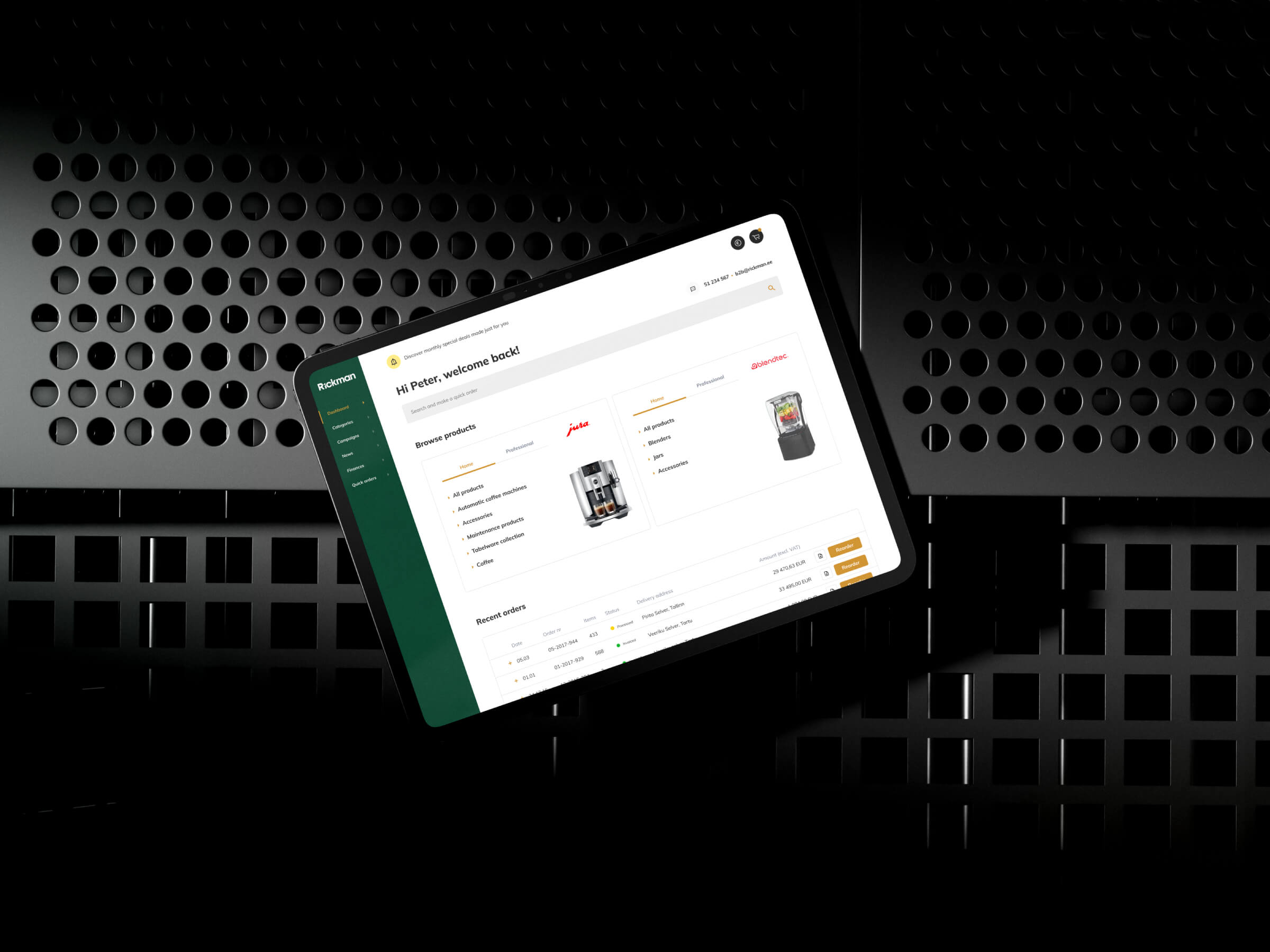
One example is the Rickman B2B reseller platform, connected with Microsoft Business Central. Instead of fragmented communication and operational friction, the platform created a cleaner operational experience for resellers and internal teams alike.
Another example is the JURA technician service application, where operational workflows, service operations, and ERP-connected functionality were redesigned into a much more usable field experience for technicians.
.jpg)
The important pattern is this:
The ERP remained.
The operational experience improved dramatically.
That is usually the safer and smarter path for many growing companies.
Why portal development is changing rapidly
Historically, custom portal development often felt slow, expensive, and risky.
That is changing quickly.
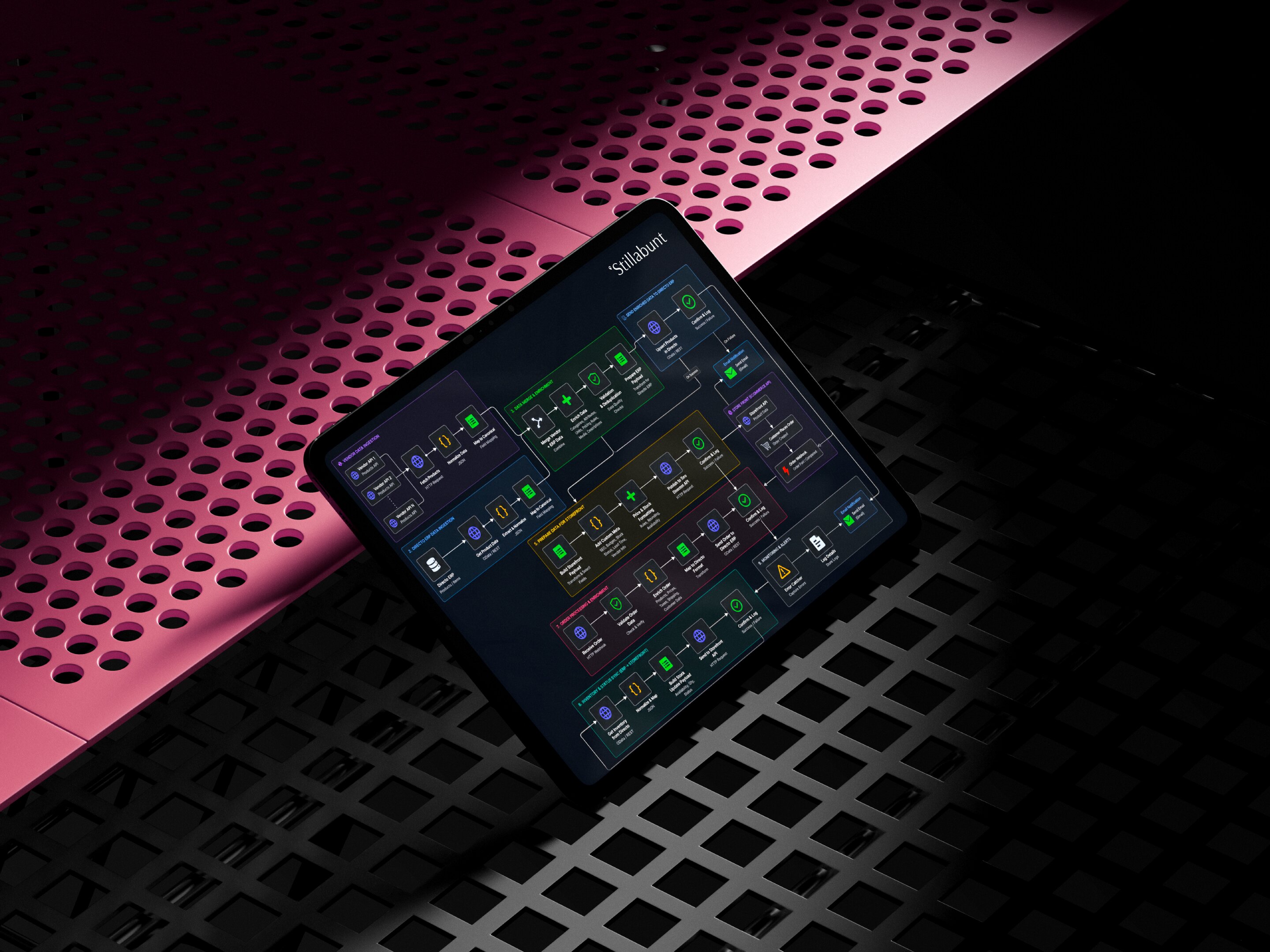
Modern agentic development workflows allow experienced teams to prototype, validate, and launch operational systems significantly faster than traditional development cycles.
The important nuance:
AI does not replace operational understanding.
AI accelerates execution.
At Xfiner, modern delivery workflows combine:
- human operational expertise
- UX/UI design
- system architecture
- AI-assisted development
- rapid prototyping
- operational validation
- focused integrations
Combined with modern stacks like:
- Codex
- Vercel
- Railway
- Supabase
- Mixpanel
- AI-assisted workflows
- operational analytics
- modern API infrastructure
This allows teams to move faster while still maintaining:
- operational safety
- scalability
- maintainability
- UX quality
- integration reliability
That balance matters enormously.
Because operational systems are not landing pages.
People rely on them daily.
You probably do not need another ERP
This is where many businesses overcomplicate the conversation.
The company already has systems.
Usually too many systems.
The real problem is often:
- fragmented workflows
- disconnected operational layers
- poor UX
- manual coordination
- spreadsheet dependency
- lack of visibility
- operational friction between teams
Replacing the ERP rarely solves all of that alone.
Sometimes it simply resets the same problems into newer software.
A better operational layer often creates more value faster.
Especially when it:
- integrates with existing systems
- reduces operational drag
- improves usability
- removes repetitive manual work
- creates visibility people trust
Final thoughts
The spreadsheet was never supposed to become the operational backbone of the company.
But quietly, in many businesses, it did.
Not because teams failed.
Because teams adapted.
They adapted around friction.
Around missing workflows.
Around disconnected systems.
Around operational realities software vendors never fully considered.
That adaptation kept operations alive.
But over time, it also created hidden operational weight that companies carry every single day.
Duct Tape Files exists to explore those realities honestly.
Because many businesses already know something feels heavier than it should.
The approvals.
The exports.
The duplicated work.
The constant coordination.
The operational rituals nobody questions anymore.
And increasingly, companies are realizing something important:
They do not necessarily need to replace everything.
Sometimes they simply need a better operational layer around the systems they already trust.
If your team is currently living inside spreadsheet workflows around Dynamics 365 or Microsoft Business Central, Xfiner is happy to advise, map workflows, explore possibilities, and help modernize the operational experience carefully and realistically.
Not through hype.
Through operational clarity.
P.S. Duct Tape Files is Xfiner’s ongoing editorial series documenting the operational realities behind growing businesses - the workflows, workarounds, integrations, spreadsheets, and hidden systems that quietly keep companies running.


.png)



.jpg)

.jpg)



.png)

.png)

.jpg)

.png)

.png)